

Local metric field#
Author: laquitainesteeve@gmail.com
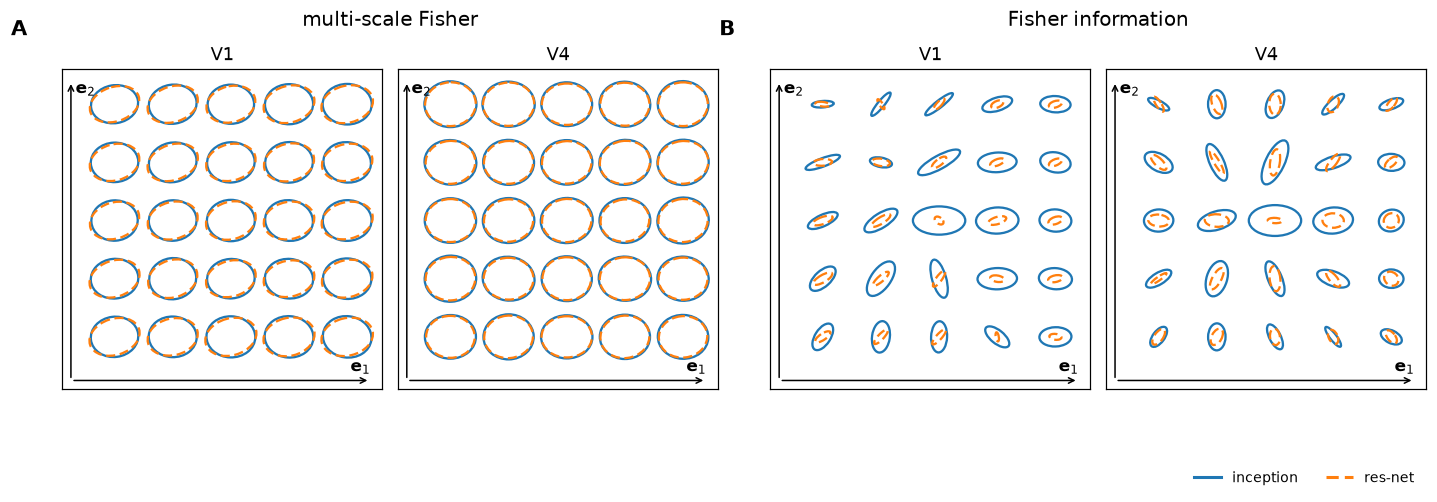
Goal: Plot the local metric field around a reference image: perturb it along the two leading eigenvectors of the Inception model’s G(x), and draw the projected metrics of Inception and ResNet-50 as ellipses (paper Fig. 5).
Requirements: the datasets and checkpoints (see the README) and a GPU.
Time: about 26 min for the default 5 x 5 grid, both areas and both models, on one GPU.
Details
What is drawn: at every perturbed image, the metrics of the Inception and ResNet-50 models are projected onto the same 2-D subspace (A: G(x), B: the Fisher metric J(x); V1 left, V4 right).
Reading it: ellipses that vary smoothly and agree between the two models mean that the geometry reflects the neural code and not the fitted model; ellipses that jump around and disagree mean it reflects the model. In the paper, G(x) is stable and J(x) is not.
Cost: every grid point of every model needs one G(x) estimate (about 15 s on an RTX 5090); J(x) takes seconds. Processes sharing one GPU are slower than one, so a single background process is used.
The job and its launcher are in
multigeom.pipeline.metric_field_job, the computation inmultigeom.pipeline.metric_field, the drawing infigures/fig5.py. This notebook only sets parameters and calls them.
1. Setup#
1.1. Install package#
On Google Colab, install multigeom and diffusers; elsewhere this does nothing.
[1]:
%%time

# on Google Colab install the package from PyPI, without its dependencies: Colab already
# has torch, numpy, scipy and matplotlib, and reinstalling torch is slow and can break
# the GPU runtime (nothing to do on your own machine)
import sys

if "google.colab" in sys.modules:
    %pip install -q --no-deps --pre multigeom
    %pip install -q "diffusers>=0.30,<0.38"     # the diffusion model of this notebook
CPU times: user 2 μs, sys: 0 ns, total: 2 μs
Wall time: 2.62 μs
1.2. Imports and parameters: what to compute#
Set GRID_SIZE, AREAS, METRICS and the reference image IMG_IDX in the next cell. Typical settings:
Case |
|
|
|
Time on one RTX 5090 |
|---|---|---|---|---|
quick check |
3 |
|
|
seconds |
G(x) and J(x) for one area |
3 |
|
|
about 5 min |
the full figure (default) |
5 |
|
|
about 24 min (measured) |
Details
IMG_IDXis the reference image, an index into the TinyImageNet validation images (the same order as the G(x) estimation of notebook 4).The grid is
GRID_SIZExGRID_SIZEimages around the reference,x(a, b) = x0 + a * e1 * v1 + b * e2 * v2, wherev1,v2are the leading eigenvectors of the metric being drawn at the reference image (Inception).Step sizes (
STEPS, per metric). G uses0.5 sqrt(lambda), about 0.3. J(x) has far larger eigenvalues, so the same rule would give steps of 5 to 7: the perturbed images are clipped to [-1, 1], the local structure is lost, and off-centre the ResNet-50 ellipses come out larger than the Inception ones. A small fixed step of 0.3, the size of G’s steps, keeps the field smooth and the Inception ellipses outside the ResNet-50 ones, as in the paper’s panel B. The paper does not state its step sizes, so this is a choice;multigeom.pipeline.metric_fielduses0.5 sqrt(lambda)for both metrics by default, and this notebook runs it once per metric.Reference image 64. The paper does not state its reference image, and the field depends strongly on it. In the paper’s panel B the central ellipses are horizontal and, towards the edges, the ellipses turn so that they point radially away from the centre, with Inception outside ResNet-50. We scanned the 200 test images with six perturbation settings: image 64 with a fixed step of 0.2 to 0.3 is the only one that is both radial (score 0.81 in V1 and 0.91 to 0.94 in V4, where 1 is perfectly radial and random orientations give 0.64) and has Inception clearly outside ResNet-50 (area ratio 5 to 6 in V1, 2.5 to 3 in V4). Image 0, the default of
multigeom.pipeline.metric_field, shows the radial pattern only for ResNet-50.Ellipse convention: width
2 sqrt(mu_max)and height2 sqrt(mu_min)of the projected 2 x 2 matrix, angle of the major axis from thev1axis. Within each plot all ellipses share one scale, so sizes compare across grid points and models, not between plots.Not reproduced: in the paper’s panel A the V1 ellipses of G(x) are strongly elongated. Here G(x) is nearly isotropic in the plane (the ratio of its two leading eigenvalues is 1.3 to 1.65 for every image tried), so the ellipses are nearly round. Possible causes are the diffusion checkpoints (epoch 120 here, 200 in the paper’s configuration) or a different definition used for the paper.
time: <1 sec
[2]:
%%time

# import built-in packages
import os, sys
from pathlib import Path
import importlib

# move to the repository root (the folder containing environment.yml): data/ and runs/
# are read from there
root = Path.cwd().resolve()
while not (root / "environment.yml").exists() and root != root.parent:
    root = root.parent

if (root / "environment.yml").exists():
    os.chdir(root)

sys.path.insert(0, str(root))  # the figures/ folder of this repository

# import custom packages
from multigeom.utils import show_figure
from figures.fig5 import make_figure
from multigeom.pipeline import metric_field_job as lmf

importlib.reload(lmf)  # update the modules without restarting the kernel

# parameters (see the table above)
# reference image (index into the TinyImageNet validation images); 64: best match of
# the paper's panel B
IMG_IDX = 64
GRID_SIZE = 5  # odd: the grid is GRID_SIZE x GRID_SIZE images

# perturbation size per metric: (rule, size)
#   "sqrt_lambda": step_i = size * sqrt(lambda_i)   (about 0.3 for G)
#   "fixed": step_i = size   (J's eigenvalues are far larger)
STEPS = {"G": ("sqrt_lambda", 0.5), "J": ("fixed", 0.3)}
AREAS = ("V1", "V4")  # ("V1",) for a quicker run
METRICS = ("G", "J")  # G(x) is the expensive one
DEVICE = "gpu"  # "gpu" | "cpu" (a CPU is far slower)

# the job: what to compute
job = lmf.MetricFieldJob(
    img_idx=IMG_IDX,
    grid_size=GRID_SIZE,
    steps=STEPS,
    areas=AREAS,
    metrics=METRICS,
    device=DEVICE,
)

RUN = True  # False: only print the estimate. True: launch the computation.
RESTART = True  # True: first delete this job's results, to recompute them from scratch

print(job)
lmf.print_estimate(job)
MetricFieldJob(img_idx=64, grid_size=5, steps={'G': ('sqrt_lambda', 0.5), 'J': ('fixed', 0.3)}, reference_encoder='inception', other_encoder='resnet50', areas=('V1', 'V4'), metrics=('G', 'J'), device='gpu')
102 G(x) estimates and 102 J(x) evaluations: about 26.0 min on one GPU (a G(x) estimate takes ~15 s on an RTX 5090).
CPU times: user 3.19 s, sys: 81.5 ms, total: 3.27 s
Wall time: 801 ms
[2]:
MetricFieldEstimate(g_estimates=102, j_evaluations=102, seconds=1560.6)
1.3. Download checkpoints and data#
The trained encoders and diffusion models come from Hugging Face; TinyImageNet gives the test images (240 MB the first time).
[ ]:
%%time

from huggingface_hub import snapshot_download
from multigeom.datasets import download_tinyimagenet

# the trained encoders and diffusion models (files that are already there are kept)
snapshot_download(repo_id="steevelaquitaine/multigeom", local_dir="runs")

# TinyImageNet, for the test images (240 MB the first time, nothing afterwards)
download_tinyimagenet()
CPU times: user 538 ms, sys: 72.2 ms, total: 610 ms
Wall time: 982 ms
PosixPath('/home/steeve/steeve/idv/code/multigeom-tutorials/data/tiny-imagenet-200')
2. Run#
The computation runs in a background process: it survives a kernel crash, and launching again computes only what is missing. Log: runs/logs/metric_field.log. Set RESTART = True above to recompute from scratch (this deletes only this job’s result files).
time: <1 sec
[4]:
%%time
if not RUN:
    print("RUN is False: nothing was started. Set RUN = True above to launch.")
else:
    # 1. optionally delete this job's results
    if RESTART:
        lmf.clear_results(job)

    # 2. launch the background process, unless everything is computed
    if lmf.is_complete(job):
        proc = None
        print("All parts are already computed: nothing to launch.")
    else:
        proc = lmf.launch(job)
        print(proc)
deleted 0 result file(s)
{'pid': 1407273, 'log': '/home/steeve/steeve/idv/code/multigeom-tutorials/runs/logs/metric_field.log', 'device': 'gpu'}
CPU times: user 952 μs, sys: 0 ns, total: 952 μs
Wall time: 1.31 ms
2.1. Wait for the computation#
This cell waits for the process and shows a progress bar over the (metric, area) parts. Interrupting the kernel stops the process; finished parts are kept.
Details
The bar moves when a part is finished, so with one area it moves only a few times. To only stop waiting, pass stop_on_interrupt=False. If the kernel dies, the process keeps running; lmf.stop() stops it from a later session.
time: 24 min
[5]:
%%time

# wait for the background process (a progress bar over the parts)
lmf.wait(job, globals().get("proc"))
local metric field: 100%|█| 4/4 [24:30<00:00, 367.51s/part, 0 process running; 4/4 (metric, area) pa
all parts done
CPU times: user 45.8 ms, sys: 5.3 ms, total: 51.1 ms
Wall time: 24min 30s
[5]:
True
3. Plot Fig. 5#
A: G(x), B: the Fisher metric J(x); the reference (Inception) is drawn solid blue and the comparison (ResNet-50) dashed orange; parts that were not computed are left blank.
time: <1 sec
[6]:
%%time

# draw the ellipses of the parts that are finished
if lmf.progress(job)[0] == 0:
    print("Nothing to plot yet: run the cells above first.")
else:
    show_figure(make_figure(lmf.load_records(job)))
CPU times: user 203 ms, sys: 10 ms, total: 213 ms
Wall time: 213 ms